
Live without your Facebook account for a month! If the mere thought ran chills down your spine, imagine how difficult it would be if you had to do it in reality.
In today’s day and age, Facebook has become synonymous with our lives. After all, our entire life and its story can be traced on the social media platform.
 So, assuming that you have to deactivate your Facebook account either because you have your exams and you can help some distraction out of your way, or because you no longer find Facebook interesting, we bring to you this article that will help you in deactivating your Facebook account.
How To Deactivate Facebook Account?
Facebook really plays its cards well as the deactivation option is a bit hidden. It generally takes some amount of time to figure out from where you can deactivate your account. Most people choose to temporarily deactivate their accounts and not delete them permanently because saying goodbye to Facebook can be painful. Now that you have decided to take a break from Facebook for a while, here are the steps you need to follow to deactivate your Facebook account:
#1. Log in to your account.
#2. On the top right corner, in the toolbar that has the link to your profile and home, you’ll see an inverted triangle. Click on the inverted triangle.
#3. As soon as you click on the inverted triangle, you’ll see a drop down menu. In that menu, find and click on ‘Settings.’
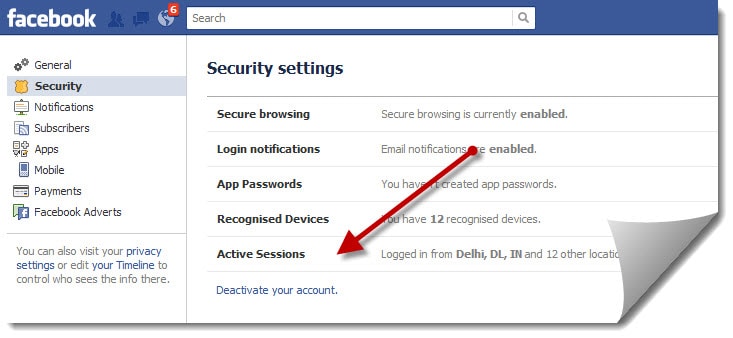
#4. Once you click on settings, Facebook will take you to a page where you can manage your account.
#5. Under the ‘General Account Settings’ tab, find the option ‘Manage Account’ and click on ‘Edit.’
#6. As soon as you click on edit, it will expand into a new section where you can see two options: ‘Request account deletion’ and ‘Deactivate your account.’ Click on the latter.
#7. Facebook will then make a last ditch effort to stop you from leaving and will ask you the reason for deactivating your account.
 #8. Select the option that matches your reason. If you don’t want to see emails from Facebook during the time you’re away, make sure you select the option ‘Opt out of receiving future emails from Facebook.’
#9. Once you’ve done that, just hit deactivate to temporarily disable your Facebook account.
So there you have it. A step-by-step guide on how to deactivate Facebook Account.
In today’s day and age, Facebook has become synonymous with our lives. After all, our entire life and its story can be traced on the social media platform.
How To Deactivate Facebook Account?
Facebook really plays its cards well as the deactivation option is a bit hidden. It generally takes some amount of time to figure out from where you can deactivate your account. Most people choose to temporarily deactivate their accounts and not delete them permanently because saying goodbye to Facebook can be painful. Now that you have decided to take a break from Facebook for a while, here are the steps you need to follow to deactivate your Facebook account:
#1. Log in to your account.
#2. On the top right corner, in the toolbar that has the link to your profile and home, you’ll see an inverted triangle. Click on the inverted triangle.
#3. As soon as you click on the inverted triangle, you’ll see a drop down menu. In that menu, find and click on ‘Settings.’
#4. Once you click on settings, Facebook will take you to a page where you can manage your account.
#5. Under the ‘General Account Settings’ tab, find the option ‘Manage Account’ and click on ‘Edit.’
#6. As soon as you click on edit, it will expand into a new section where you can see two options: ‘Request account deletion’ and ‘Deactivate your account.’ Click on the latter.
#7. Facebook will then make a last ditch effort to stop you from leaving and will ask you the reason for deactivating your account.
#9. Once you’ve done that, just hit deactivate to temporarily disable your Facebook account.
So there you have it. A step-by-step guide on how to deactivate Facebook Account.
0 comments:
Post a Comment